


Terminal + API — a keyboard-driven TUI for exploring, testing, and automating REST and GraphQL APIs, without leaving your terminal.
| Tool | Problem |
|---|---|
| Postman / Insomnia | Electron, cloud account required, heavy |
| ATAC | Great REST TUI, but no GraphQL, no scripting |
| hurl | Excellent for scripting, no interactive TUI |
| HTTPie | Terminal, but not TUI |
terapi aims to be all of the above in one tool:
- GraphQL native — schema introspection, variable editing, collections save/load
- Pipeline automation — chain requests, extract variables, run campaigns headlessly
- Local-first — collections stored as TOML, git-friendly, no account, no cloud
- Single binary —
cargo install terapi, instant startup, zero Electron
- USAGE.md — full documentation
- CHANGELOG.md — what's new
- terapi-keymap.html — printable keyboard reference (HTML)
- terapi-keymap.pdf — printable keyboard reference (PDF)
cargo install terapiOr build from source:
git clone https://github.com/tsodev/terapi
cd terapi
cargo build --release
./target/release/terapi
Requirements: Rust 1.75+ (edition 2021), any modern terminal with 256-color support.
Environment setup — terapi-env.sh (included in the repo) configures all environment variables with sensible defaults and launches terapi:
./terapi-env.sh                        # TUI
./terapi-env.sh run campaign.toml      # headless runner
source ./terapi-env.sh # export vars only, no launchterapi # launch TUI
terapi --demo response.json # launch TUI with a JSON file pre-loaded
terapi build # open campaign builder (blank)
terapi build my_campaign.toml # open campaign builder (existing file)
terapi run campaign.toml # run a campaign headlessly
terapi run campaign.toml -p KEY=VAL # override a [[params]] value
terapi run campaign.toml --silent # exit 0/1 only (CI/cron)
terapi run campaign.toml --only "Login" # run only the named step(s)
terapi run campaign.toml --format json # machine-readable JSON output
terapi run campaign.toml --format csv # CSV output (one row per step)
terapi run campaign.toml --retry 3 # retry failed steps (exp. backoff)
terapi import file.toml # import a collection or campaign TOML
terapi --version
terapi --helpterapi import <file-or-url> auto-detects the format from Content-Type/extension/content and copies the result to the right directory. The argument can be a local path or an http(s):// URL — in the URL case the document is downloaded first, then detected the same way:
terapi import my_collection.json        # Postman v2.1 collection or environment
terapi import insomnia_export.json      # Insomnia v4 export
terapi import petstore.yaml             # OpenAPI 3.x document (YAML or JSON)
terapi import https://petstore3.swagger.io/api/v3/openapi.json   # fetched over HTTP
After import, a report is printed:
✓ Postman v2.1 — "My API"  →  ~/.config/terapi/collections/my-api.toml
  Requests  : 23
  Folders   : 5
  Env       : "My API vars"  →  ~/.config/terapi/envs/my-api-vars.toml  (8 vars)
  ! 2 formdata step(s) degraded to raw body
  ! 1 script(s) ignored (pre/post-request scripts not supported)
Supported:
- Postman v2.1 — collections (folders, requests, auth, headers, body, raw/GraphQL/formdata) + environment files; collection variables saved as a separate terapi env
- Insomnia v4 — collections (nested folders, GraphQL, auth) + base environments and sub-environments merged; gRPC/WebSocket entries counted but skipped
- OpenAPI 3.x (YAML or JSON) — one-shot import, like Postman/Insomnia: each operation becomes a request (grouped into folders by its first
tag), path/query/header parameters become{{VAR}}placeholders seeded into a generated env (using each parameter'sexample/defaultwhen the spec provides one), and a JSON request body is taken from the spec'sexample/examplesor synthesized from its schema when neither is present. Re-importing the same file does not merge — it overwrites the collection file, so treat re-import as "start over," not "sync." Swagger 2.0 documents are rejected with a clear message (not supported, only OpenAPI 3.x).
Auth mapping: Bearer → Bearer · Basic → Basic · API Key → API Key · OAuth2 → OAuth2 Client Credentials or Authorization Code (OpenAPI import picks whichever flow the spec defines and carries over the real tokenUrl/authorizationUrl — Postman/Insomnia imports only get a client-credentials placeholder since Postman's own auth block doesn't carry OAuth2 flow URLs)
Try it: terapi import examples/openapi/petstore.yaml — a trimmed spec exercising path/query/header params, a $ref request body, and Bearer auth. For a much larger real-world spec (1200+ operations, hundreds of shared $ref parameters like owner/repo), import it straight from a URL: terapi import https://raw.githubusercontent.com/github/rest-api-description/main/descriptions/api.github.com/api.github.com.yaml.
Merging several OpenAPI sources into one collection: pass more than one FILE_OR_URL (with --name <NAME> for the merged collection) to combine them instead of writing one file per source — useful for a vendor that splits its API across multiple product-specific spec files, e.g. Open-Meteo's nine separate forecast/air-quality/marine/... documents. Each source keeps its own {label}_base_url var (since they commonly point at different hosts); see USAGE.md for the full example and details.
Prefer a printable cheat sheet? Two-page A4-landscape reference covering the main TUI and the campaign builder — HTML or PDF.
| Key | Action |
|---|---|
Tab |
Cycle panels forward |
Shift+Tab |
Cycle panels backward |
Request panel
| Key | Action |
|---|---|
Tab |
Switch panel |
e |
Edit URL (enter URL mode) |
m |
Cycle HTTP method (outside URL mode) |
↑ / ↓ |
Cycle HTTP method (in URL mode) / move response cursor / scroll |
PgUp / PgDn |
Move response cursor / scroll — 10 rows/lines at a time |
n |
New request — clear all fields |
s |
Send request |
S |
Save current request to a collection |
i |
Edit description (Description sub-tab — enter editor) / Edit body (Body sub-tab — enter editor) |
a / d / Enter |
Headers sub-tab — add / delete / edit header |
a / d / Enter |
URL Params sub-tab — add / delete / edit param |
t |
Toggle body mode: Text ↔ JSON (Body sub-tab, outside editor) |
a / d / Enter (or e) |
Body sub-tab (JSON mode, after i) — add / delete / edit field |
E |
Open body in external JSON editor ($TERAPI_JSON_EDITOR, defaults to jsoned) |
← / → |
Navigate sub-tabs (also exits URL mode) |
Enter |
Finish URL edit (URL mode, does not send — press s after) / fold-unfold JSON node / edit body field (JSON mode) |
Esc |
Finish URL edit / exit body editor |
{{ |
Open variable picker (any editable field) — insert {{VAR}} from active env or built-in variables (yellow, always available) |
↑ / ↓ |
Auth sub-tab — navigate fields |
Space / Enter |
Auth sub-tab (Type row) — cycle auth type (No Auth → Bearer → Basic → API Key → OAuth2 CC → OAuth2 AC) |
Enter |
Auth sub-tab (field row) — open edit modal for token / username / password / key / OAuth2 fields |
f |
Auth sub-tab — fetch OAuth2 token manually (without sending the request) |
Esc |
Auth sub-tab — cancel OAuth2 browser wait or clear OAuth2 error |
a / d / Enter |
Extract sub-tab — add / delete / edit an extract-to-env rule |
↑ / ↓ |
Options sub-tab — navigate between options |
Space / Enter |
Options sub-tab — toggle (Skip TLS / Follow redirects / Cookie jar) or cycle timeout |
r |
Cycle response view: JSON → Raw → HTTP (full diagnostics + redirect chain + cookies) |
f |
JSON view, cursor on a URL value (e.g. pagination next) — load it into the URL bar; does not send — press s afterward |
d |
Diff last two responses using $TERAPI_JSON_DIFFER (structural, e.g. jsoned), else $TERAPI_DIFF (or diff -u | less); available after 2nd request |
- / = |
Resize Key column |
q q |
Quit (press twice to confirm) |
Extract to env — auto-capture a value from the response
The Extract sub-tab holds a list of var_name ← dot.path rules (same dot-path language as a campaign step's [steps.extract]) that run automatically against every successful response from this request, writing matches into the active environment and saving it to disk. The classic use case: on a Login request, add token ← token (or whatever field your API returns, e.g. accessToken) once, and every future send of that request refreshes {{token}} for use in other requests — no more copy-pasting a JWT out of the response by hand. A rule whose path doesn't match anything in the response is silently skipped (same behavior as campaigns); if no environment is active, the status bar shows ⚠ extract configured but no active environment instead of writing nowhere silently.
GraphQL mode (activate with g)
| Key | Action |
|---|---|
g |
Toggle GraphQL mode (REST ↔ GraphQL) |
← / → |
Navigate GraphQL sub-tabs (Query / Variables / Headers / Auth / Extract / Schema / Options) |
i |
Query tab — enter query editor |
Ctrl+Space |
Query tab — open autocompletion popup (fields / type names) |
Esc |
Query tab — exit query editor |
a / d |
Variables tab — add / delete variable |
Enter |
Variables tab — edit selected variable |
a / d / Enter |
Headers tab — add / delete / edit header |
a / d / Enter |
Extract tab — add / delete / edit an extract-to-env rule |
↑ / ↓ |
Variables tab — navigate variables |
f |
Schema tab — fetch type list via introspection |
↑ / ↓ |
Schema tab — navigate type list |
Enter |
Schema tab — load fields for selected type |
s |
Send GraphQL request |
S |
Save request to collection (query + variables preserved) |
Collections panel
| Key | Action |
|---|---|
Tab |
Switch panel |
↑ / ↓ |
Move cursor |
Enter |
Expand / collapse folder — or load request into Request tab |
n |
New collection |
f |
New folder in selected collection |
a |
Add request to selected collection / folder |
e |
Edit selected request — loads into Request tab with all fields editable; S opens Update Request modal pre-filled with name/collection/folder |
D |
Duplicate selected request — loads all fields, opens Save modal with "<name> copy" in same collection/folder, saves as new entry |
E |
Open collection TOML in $EDITOR — TUI suspends, reloads on exit |
/ |
Search / filter the collection tree — type to narrow the list, ↑/↓ navigate, Enter loads, Esc closes |
d |
Delete selected item |
q q |
Quit (press twice to confirm) |
Env panel
| Key | Action |
|---|---|
Tab |
Switch panel |
← / → |
Switch focus: Environments ↔ Variables |
↑ / ↓ |
Navigate within focused panel |
Enter |
Activate selected environment (focus left) / Edit selected variable (focus right) |
| — | The Environments list always has a "No active environment" row at the top — select it and press Enter to deactivate (no {{VAR}} resolves against any env's vars) |
n |
New environment |
s |
Toggle "sensitive" on the selected environment (focus left) — requires confirmation before any mutating request (see below) |
a |
Add variable to selected environment |
d |
Delete selected environment or variable |
q q |
Quit (press twice to confirm) |
Sensitive environments — confirm before mutating
An environment marked sensitive (s in the Env panel, shown as 🔒 sensitive in the list) requires confirmation before sending any request that could modify data — any non-GET REST method, or a GraphQL mutation (a GraphQL query/subscription never prompts, since GraphQL always uses POST regardless of read/write). Pressing s to send such a request opens a modal instead of firing immediately:
| Key | Action |
|---|---|
y / Enter |
Confirm — send this one request |
a |
Confirm and don't ask again for the rest of this session |
n / Esc |
Cancel — request not sent |
This is TUI-only (interactive s to send) — headless campaigns (terapi run) and the builder's step preview run unattended by design and are never gated by this.
History panel
| Key | Action |
|---|---|
Tab |
Switch panel |
↑ / ↓ |
Navigate entries |
Enter |
Load entry into Request tab (GraphQL entries restore GQL mode + query) |
d |
Delete entry |
q q |
Quit (press twice to confirm) |
Campaigns panel
| Key | Action |
|---|---|
Tab |
Switch panel |
↑ / ↓ |
Navigate campaign list (List focus) — or move step cursor (Done panel, Result focus) |
r |
Run selected campaign — or open params modal if [[params]] defined |
L |
Load selected step into Request tab (Done panel, Result focus) |
E |
Open campaign TOML in $EDITOR — TUI suspends, reloads on exit |
o |
View a [[outputs]] file written by the last run, in $TERAPI_JSON_EDITOR/$EDITOR/$VISUAL — cycles through multiple outputs on repeat |
Esc |
Clear run result |
q q |
Quit (press twice to confirm) |
The Campaigns tab lists all .toml campaign files found in <terapi_dir>/campaigns/ and lets you run them interactively without leaving the terminal.
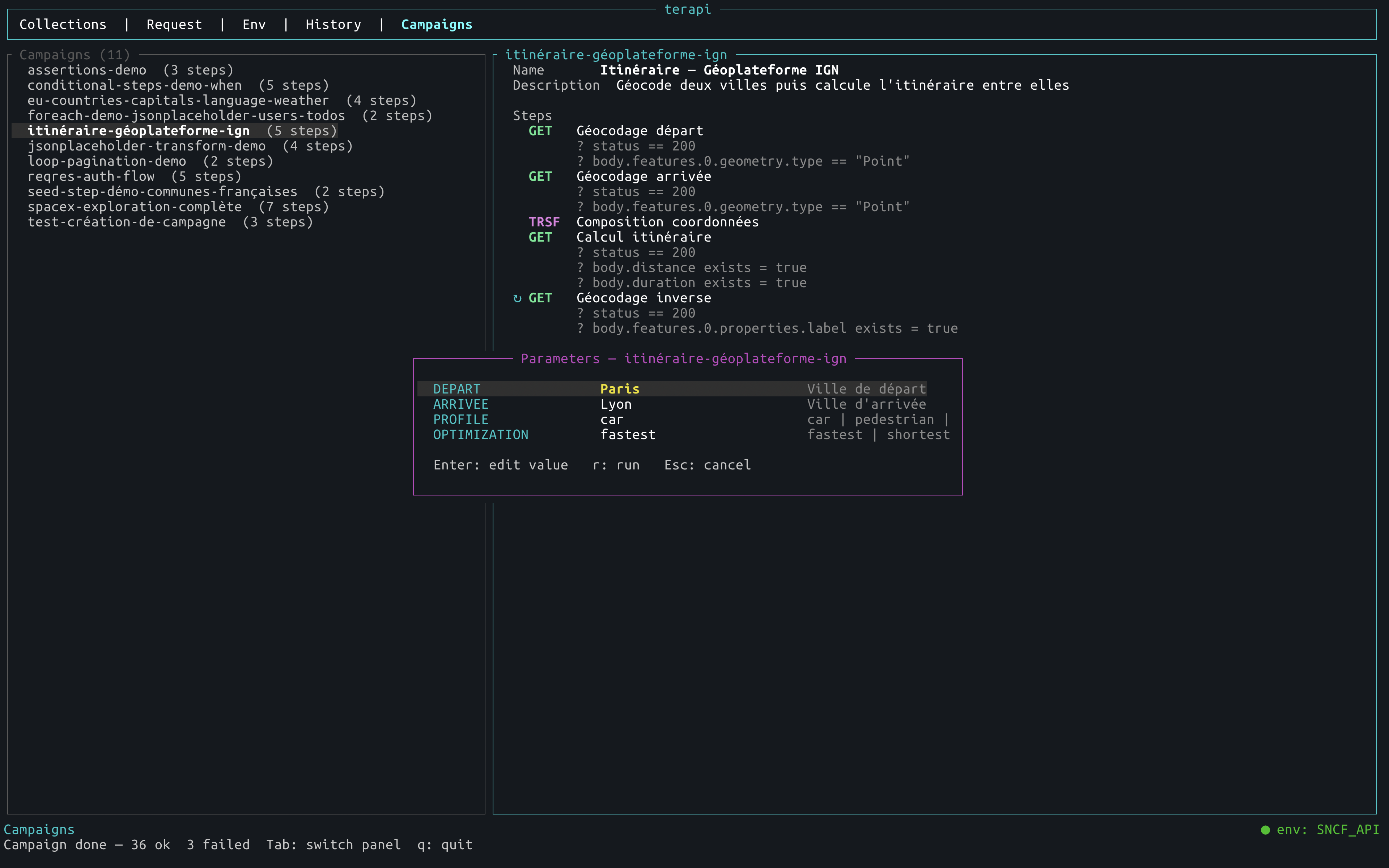
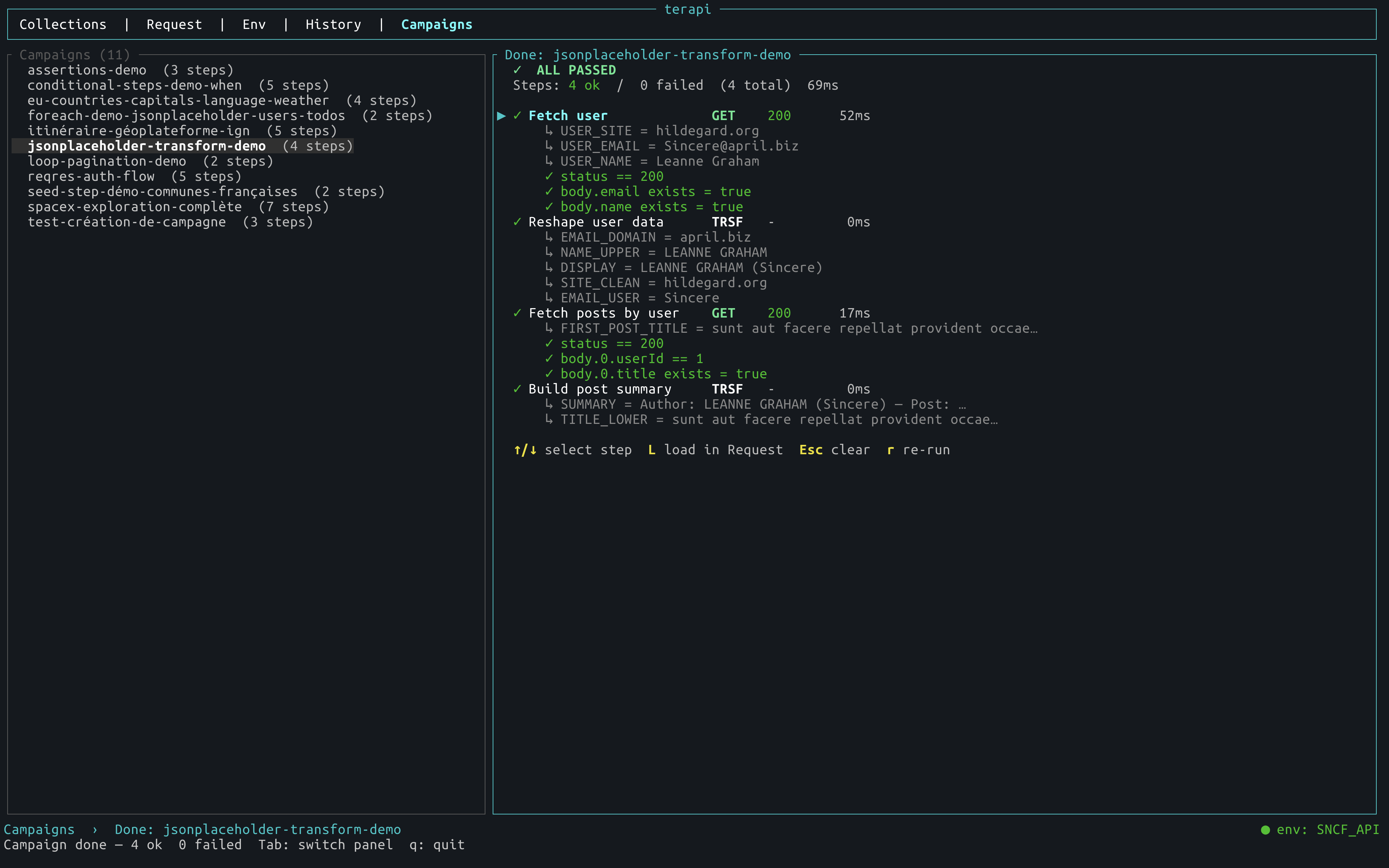
The right panel has three states:
- Idle — campaign metadata (name, description, step list) and a
rreminder - Running — each completed step appears immediately;
⟳ current step…shows what is in flight - Done — colour-coded verdict (
✓ ALL PASSED/✗ SOME STEPS FAILED), per-step results, extracted variables, assertion failures; if the campaign has[[outputs]], the status bar addso: viewto open the written file(s) in$TERAPI_JSON_EDITOR/$EDITOR
Place campaign files in the campaigns directory:
# Global
cp examples/campaigns/crud_demo.toml ~/.config/terapi/campaigns/

# Per-project
mkdir -p .terapi/campaigns
cp examples/campaigns/transform_demo.toml .terapi/campaigns/

# Or use the import command (auto-detects collection vs campaign)
terapi import examples/campaigns/crud_demo.tomlPress r twice from the response area to reach the HTTP view. It shows the complete exchange in wire format — useful when you need to see exactly what was sent and what came back:
── Request ──────────────────────────────────────────────
POST /login HTTP/1.1
Host: api.tsodev.fr
Content-Type: application/json
Cookie: session=abc123            ← jar cookies when cookie jar is enabled
Content-Length: 45

{"username":"thierry","password":"Pr0bleme#"}

── Response ─────────────────────────────────────────────
HTTP/1.1 200 OK
Content-Type: application/json

{"token":"eyJ0eXAiOiJKV1Qi…"}

── Redirects ────────────────────────────────────────────   ← 3xx hops (when follow redirects on)
  1  301 → https://www.example.com/login

── Cookies ──────────────────────────────────────────────   ← Set-Cookie details
  session=abc123  ; Path=/; HttpOnly

── Diagnostics ──────────────────────────────────────────
  Elapsed     84 ms                   ← green <300ms / yellow <1s / red ≥1s
  Size        1.2 KB
  Type        application/json; charset=utf-8
  Server      nginx/1.24.0
Transport errors (DNS failure, TLS error, timeout) are displayed inline with the full caused by: chain.
Above 1 MB, the Raw view and the HTTP view's response body show a short notice instead of the raw text (word-wrapping a multi-megabyte body every frame is expensive) — use r for the JSON view (cached and windowed, stays fast on huge responses) or E to open the full body in an external editor.
Collections are stored as TOML files — one file per collection. Terapi resolves the storage directory in priority order:
| Priority | Location | Use case |
|---|---|---|
| 1 | $TERAPI_DIR |
CI, cron, custom path |
| 2 | ./.terapi/collections/ |
Per-project, versionable in Git |
| 3 | ~/.config/terapi/collections/ |
Global, cross-project (default) |
[collection]
name = "My API"
description = "Optional description"

[[folders]]
name = "Auth"

[[folders.requests]]
name = "Login"
method = "POST"
url = "https://api.example.com/auth/login"
body = '{"email": "{{EMAIL}}", "password": "{{PASSWORD}}"}'

[folders.requests.headers]
Content-Type = "application/json"

[[requests]]
name = "List users"
method = "GET"
url = "https://api.example.com/users"

[requests.headers]
Authorization = "Bearer {{TOKEN}}"
See examples/collections/collection.toml for a fully annotated template.
Ready-to-use collections in examples/collections/ — copy them to your terapi directory to get started immediately:
| File | Contenu | Auth |
|---|---|---|
public-rest.toml |
JSONPlaceholder, ReqRes, httpbin, PokeAPI, CoinGecko | Aucune |
graphql.toml |
Countries API, Rick & Morty API (POST GraphQL) | Aucune |
rick-morty-graphql.toml |
Rick & Morty API — personnages, épisodes, lieux, filtres, pagination, introspection | Aucune |
countries-graphql.toml |
Countries API — pays, continents, langues, filtres, introspection | Aucune |
spacex-graphql.toml |
SpaceX — company, rockets, dragons, ships, launches, roadster, cores, capsules, missions (~20 requêtes) | Aucune |
sncf.toml |
API SNCF — gares, horaires, itinéraires, perturbations | Basic {{SNCF_TOKEN}} |
france-geo.toml |
API Géo + API Adresse IGN — communes, départements, régions, géocodage | Aucune |
france-eau.toml |
Hub'Eau — hydrométrie, qualité rivières et nappes | Aucune |
france-meteo.toml |
Météo-France — prévisions, observations, vigilance | Bearer {{METEO_TOKEN}} |
bnf-catalogue.toml |
BnF — catalogue général SRU (notices bibliographiques UNIMARC + notices d'autorité) | Aucune |
# Copier une collection dans le répertoire global
cp examples/collections/france-geo.toml ~/.config/terapi/collections/

# Ou dans un projet local
mkdir -p .terapi/collections
cp examples/collections/sncf.toml .terapi/collections/Terapi includes a headless campaign runner for API automation — and the same campaigns can be run interactively from the Campaigns TUI tab (see above).
Prerequisites: most step types require no extra tools. The
kind = "jq"step requiresjqto be installed on your system (brew install jq/apt install jq).
[campaign]
name        = "Users API — smoke tests"
description = "Login then run CRUD operations"

# Optional: load a named terapi environment as base vars
env_file = "production"   # <terapi_dir>/envs/production.toml

[env]
BASE_URL = "https://api.example.com"   # overrides env_file if same key

[[steps]]
name   = "Login"
method = "POST"
url    = "{{BASE_URL}}/auth/login"
body   = '{"email": "admin@example.com", "password": "secret"}'
[steps.headers]
Content-Type = "application/json"
[steps.extract]
JWT     = "token"    # extracted from response JSON
USER_ID = "user.id"

[[steps]]
name   = "Get profile"
method = "GET"
url    = "{{BASE_URL}}/users/{{USER_ID}}"
[steps.headers]
Authorization = "Bearer {{JWT}}"

[[steps]]
name   = "Health check (staging)"
env    = "staging"   # uses staging terapi env for this step only
method = "GET"
url    = "{{BASE_URL}}/health"
Variable priority (lowest → highest): built-ins → env_file → [env] → [[params]] defaults → connector row → step env → extracted vars → runtime overrides.
Rate limiting — add rate_limit_rps at the root of the campaign TOML to enforce a minimum delay between HTTP requests (useful for APIs like crates.io that impose 1 req/s):
rate_limit_rps = 1.0 # at most 1 HTTP request per secondApplied globally across all HTTP/GraphQL/seed/loop/poll steps. For kind = "loop", also sets the minimum interval_ms between iterations.
Built-in variables are available everywhere without any environment — in the TUI, campaigns, and the builder:
| Variable | Example | Notes |
|---|---|---|
{{DATE}} |
2026-06-30 |
Today; {{DATE+1}} / {{DATE-7d}} for offsets |
{{TIME}} |
14:32:05 |
Now; {{TIME+1}} (+1 h), {{TIME-30m}} (-30 min) |
{{DATETIME}} |
2026-06-30T14:32:05 |
Date+time; arithmetic in days |
{{TIMESTAMP}} |
1751291525 |
Unix seconds |
{{TIMESTAMP_MS}} |
1751291525000 |
Unix milliseconds |
{{UUID}} |
550e8400-… |
UUID v4, new value on every send |
{{RANDOM_INT}} |
42317 |
0–99 999 |
{{RANDOM_STRING}} |
k3mw9xzp |
8-char alphanumeric |
{{APPNAME}} |
terapi |
|
{{VERSION}} |
0.10.3 |
[[params]] declares user-facing inputs with a description and a default. Params can be overridden from the CLI (-p KEY=VALUE) or the TUI params modal — without touching the TOML:
[[params]]
name        = "DEPART"
description = "Ville de départ"
default     = "Paris"

[[params]]
name        = "ARRIVEE"
description = "Ville d'arrivée"
default     = "Lyon"
terapi run itineraire_demo.toml -p DEPART=Bordeaux -p ARRIVEE=NantesIn the TUI, pressing r on a campaign with [[params]] opens an interactive form to fill in values before running.
Data flows through five stages — each one is optional:
[[params]]  →  [env_file / env]  →  [[connectors]]  →  [[steps]]  →  [[outputs]]
  user           base vars            rows (CSV /        HTTP /          write JSON
  inputs                              JSON file /        transform /     to disk
                                      seed step)         assertions
Input connectors — run the campaign once per row:
# CSV file — column names become {{variables}}
[[connectors]]
type = "csv"
path = "contacts.csv"

# JSON file — iterate over an array
[[connectors]]
type   = "json"
path   = "users.json"
select = "users"        # dot-path to the array (omit for root)

# Seed step — use an HTTP response as the data source (no file needed)
[[connectors]]
type      = "json"
from_step = "Fetch items"   # name of the seed step below
select    = ""              # empty = root of the response

[[steps]]
name   = "Fetch items"
kind   = "seed"             # runs once before the loop
method = "GET"
url    = "https://api.example.com/items"
Transform steps — reshape variables between HTTP steps:
[[steps]]
name = "Extract ID"
kind = "transform"
transforms = [
  { type = "regex",    input = "{{LOCATION}}", pattern = "/items/(\\d+)", group = 1, output = "ITEM_ID" },
  { type = "template", input = "{{FIRST}} {{LAST}}",                                 output = "FULL_NAME" },
]
Output connectors — write step results to disk after all iterations:
[[outputs]]
from_step = "Fetch items"           # step whose response body to collect
path      = "/tmp/items.json"       # written as a JSON array, one element per iteration
select    = "data"                  # optional: extract a sub-field before writing
Outputs can be chained — the file written by campaign A becomes the path of campaign B's JSON connector.
Extracted values use dot-path notation over the JSON response:
| Path | Extracts |
|---|---|
token |
response["token"] |
user.id |
response["user"]["id"] |
data.items.0.name |
response["data"]["items"][0]["name"] |
data.*.id |
all id fields from the data array → stored as a JSON array |
foreach runs a step once per element of an extracted JSON array. Use {{item}} for the current element and {{item_index}} for its 0-based position:
[[steps]]
name    = "List users"
url     = "https://api.example.com/users"
[steps.extract]
user_ids = "*.id"          # wildcard: collects all id fields → [1,2,…,10]

[[steps]]
name    = "Get profile"
foreach = "{{user_ids}}"   # iterates over each element
url     = "https://api.example.com/users/{{item}}/profile"
When each element is itself an array (e.g. [lon, lat]), terapi automatically injects {{item_0}}, {{item_1}}, … into the iteration env. When it is an object, fields are accessible as {{item_fieldname}}:
[steps.extract]
coords = "features.*.geometry.coordinates"   # → [[lon0,lat0],[lon1,lat1],…]

[[steps]]
foreach = "{{coords}}"
url = "https://api.example.com/reverse?lon={{item_0}}&lat={{item_1}}"- Each iteration streams live:
✓ Get profile [3/10] - The step shows a
↻badge in the Campaign panel idle view continue_on_errorandassertapply per iteration- Output connector collects all N bodies into the JSON array
Add when to any step to make its execution depend on a campaign variable. If the condition is false, the step is skipped (⊘ skipped) without failing the pipeline:
[[steps]]
name    = "Get user"
url     = "https://api.example.com/users/{{ID}}"
[steps.extract]
USER_TYPE = "type"   # "premium" or "free"

[[steps]]
name   = "Premium flow"
when   = { var = "USER_TYPE", eq = "premium" }
method = "POST"
url    = "https://api.example.com/premium/activate"

[[steps]]
name   = "Retry if no token"
when   = { var = "TOKEN", exists = false }
method = "POST"
url    = "https://api.example.com/auth/refresh"
Operators: eq / ne / exists = true|false / (no operator: var non-empty). Comparison values support {{VAR}}.
In the TUI idle view, steps with when show ⊘ if VAR == "value" in grey below the step name.
Filter a JSON array stored in a variable by a regex applied to a field, and store the matches in a new variable:
[[steps]]
name   = "Filter active users"
kind   = "search"
search = {input = "{{USERS}}", path = "status", match = "^active$", output = "ACTIVE_USERS"}

[[steps]]
name   = "Find first premium email"
kind   = "search"
search = {input = "{{USERS}}", path = "email", match = "@premium\\.com$", output = "FIRST_PREMIUM", first_only = true}| Field | Description |
|---|---|
input |
Variable holding the JSON array (e.g. {{USERS}}) |
path |
Dot-path into each element to match against — empty to match on the element directly |
match |
Regex pattern |
output |
Variable name to store results (default RESULTS) |
first_only |
true → store only the first match (or "null" if none); false (default) → store JSON array of all matches |
The SRCH badge (cyan) appears in the Campaigns panel idle view and in the Campaign Builder pipeline.
Poll an HTTP endpoint repeatedly until a condition is met (or timeout). Useful for waiting on async jobs, queues, or any eventually-consistent state:
[[steps]]
name   = "Wait for job to complete"
kind   = "poll"
method = "GET"
url    = "{{BASE_URL}}/jobs/{{JOB_ID}}"
[steps.headers]
Authorization = "Bearer {{TOKEN}}"
[steps.extract]
JOB_STATUS = "status"
[steps.until]
var = "JOB_STATUS"
eq  = "done"
interval_ms  = 2000   # check every 2 s (default: 1000)
timeout_secs = 60 # give up after 60 s (default: 60)| Field | Default | Description |
|---|---|---|
until |
— | Condition to stop polling: { var, eq?, ne?, lt?, lte?, exists? } — lt/lte accept numbers or strings (ISO dates) |
interval_ms |
1000 |
Delay between polls (min 100 ms; floored by rate_limit_rps if set) |
timeout_secs |
60 |
Maximum wait time before failing (max 500 iterations) |
extract variables are re-evaluated after each poll and used to test the until condition. While polling, the TUI status bar shows ⟳ poll #N — step name — Ns. The POLL badge (yellow) appears in the pipeline.
Assign one or more variables without making an HTTP call. Supports {{VAR}} substitution in values — useful for initialising state, computing derived strings, or branching logic:
[[steps]]
name = "Initialise counters"
kind = "set"
[steps.vars]
PAGE   = "1"
OFFSET = "0"
LABEL  = "run-{{RUN_ID}}"
All values support {{VAR}} interpolation from the current campaign environment. The SET badge (blue) appears in the pipeline.
Apply a jq filter to a JSON variable and store the result. Requires jq installed on the system (brew install jq / apt install jq).
[[steps]]
name          = "Extract active user IDs"
kind          = "jq"
jq_input      = "{{USERS}}"
jq_expression = "[.[] | select(.active) | .id]"
jq_output     = "ACTIVE_IDS"

[[steps]]
name          = "Get token as raw string"
kind          = "jq"
jq_input      = "{{AUTH_RESPONSE}}"
jq_expression = ".data.access_token"
jq_output     = "TOKEN"
jq_raw        = true   # pass -r: raw string output, not quoted JSON

# Combine two arrays — NAMES (stdin) + DATES (--argjson) → [{name, date}]
[[steps]]
name          = "Zip names and dates"
kind          = "jq"
jq_input      = "{{NAMES}}"
jq_expression = "[., $dates] | transpose | map({name: .[0], date: .[1]})"
jq_output     = "ZIPPED"

[steps.jq_args]
dates = "{{DATES}}"| Field | Default | Description |
|---|---|---|
jq_input |
"" |
Variable holding the JSON to process |
jq_expression |
"." |
jq filter expression |
jq_output |
"JQ_RESULT" |
Variable to store the result |
jq_raw |
false |
true → raw string output (-r); false → compact JSON |
[steps.jq_args] |
{} |
Extra variables passed as --argjson $name value; all values support {{VAR}} |
If jq is not found on the system, the step fails immediately with a clear error message. The JQ badge (green) appears in the pipeline.
jq_input must be valid JSON. If the variable holds a plain string (not an array/object), wrap it: jq_input = '"{{VAR}}"' (TOML literal string with JSON quotes inside).
Transforming arrays of strings — for fixed-format values, string slicing is simpler than regex (no escaping):
# "20260627T174700" → "27/06/2026 à 17:47" for every element
jq_expression = '[.[] | "\(.[6:8])/\(.[4:6])/\(.[0:4]) à \(.[9:11]):\(.[11:13])"]'
When regex is needed, use capture() with named groups — sub() replacement context sees captures as an object, not an array (.[0] does not work):
jq_expression = '[.[] | capture("^(?P<y>\\d{4})(?P<mo>\\d{2})(?P<d>\\d{2})T(?P<h>\\d{2})(?P<mi>\\d{2})") | "\(.d)/\(.mo)/\(.y) à \(.h):\(.mi)"]'Run multiple named steps concurrently and wait for all to complete. Useful for independent requests that don't depend on each other's output:
[[steps]]
name  = "Fetch data in parallel"
kind  = "parallel"
steps = ["Fetch users", "Fetch products", "Fetch config"]

[[steps]]
name   = "Fetch users"
method = "GET"
url    = "{{BASE_URL}}/users"
[steps.extract]
USERS = "data"

[[steps]]
name   = "Fetch products"
method = "GET"
url    = "{{BASE_URL}}/products"
[steps.extract]
PRODUCTS = "data"

[[steps]]
name   = "Fetch config"
method = "GET"
url    = "{{BASE_URL}}/config"
[steps.extract]
CONFIG = "settings"| Field | Description |
|---|---|
steps |
Array of step names to run concurrently |
continue_on_error |
If true, the parallel step succeeds even if some children fail |
Behaviour: all referenced steps are skipped in the normal sequential flow and run concurrently by the parallel step. Extracted variables from all children are merged into the campaign env (last-write-wins on conflict). The parallel step itself fails if any child fails (unless continue_on_error = true). The PAR badge (cyan) appears in the pipeline.
By convention, place the referenced steps immediately after the parallel step in the TOML — the runner handles them in any order.
Send a message to a webhook without writing a full HTTP step. Ideal for Slack, Discord, Teams, or any custom endpoint:
[[steps]]
name    = "Notify Slack"
kind    = "notify"
url     = "https://hooks.slack.com/services/T.../B.../xxx"
message = '{"text": "Pipeline complete — {{ITEM_COUNT}} items processed in {{DURATION}}ms"}'

[[steps]]
name    = "Notify Discord"
kind    = "notify"
url     = "https://discord.com/api/webhooks/..."
message = '{"content": "✓ {{CAMPAIGN_NAME}} done"}'
[steps.headers]
X-Custom-Auth = "{{WEBHOOK_TOKEN}}"| Field | Default | Description |
|---|---|---|
url |
"" |
Webhook URL |
message |
"" |
Request body — supports {{VAR}} interpolation |
method |
POST |
HTTP method |
headers |
{} |
Additional headers (Content-Type: application/json injected by default) |
The NTFY badge (magenta) appears in the pipeline.
Construct a JSON object from key/value pairs and store it in a campaign variable. No HTTP request is made. Values are {{VAR}}-resolved then parsed as JSON — arrays, objects, numbers, booleans, and null are embedded natively; anything else becomes a string:
[[steps]]
name         = "Build summary"
kind         = "build"
build_output = "SUMMARY"   # optional, default "BUILD_RESULT"

[steps.fields]
arrivals   = "{{ARR_RESULT}}"   # JSON array  → embedded as array
departures = "{{DEP_RESULT}}"   # JSON array  → embedded as array
station    = "{{GAREID}}"       # string      → embedded as string
count = "{{TOTAL}}" # "42" → embedded as number| Field | Default | Description |
|---|---|---|
[steps.fields] |
{} |
Key/value pairs — values support {{VAR}}; parsed as JSON if valid |
build_output |
BUILD_RESULT |
Variable name to store the resulting JSON object |
The field order in [steps.fields] is preserved in the JSON output. The BILD badge (green) appears in the pipeline. The [[outputs]] connector can collect the build result just like an HTTP step response.
Ready-to-run examples in examples/campaigns/ — no API key required:
| File | What it demonstrates |
|---|---|
crud_demo.toml |
All HTTP methods with assertions |
transform_demo.toml |
Transform steps: regex, template, upper, split |
seed_step_demo.toml |
Seed step + JSON connector + output connector |
itineraire_demo.toml |
[[params]] + full pipeline: geocode two cities, route via IGN, reverse-geocode each waypoint with {{item_0}}/{{item_1}}, output labelled step list |
eu_capitals.toml |
4-step pipeline: GraphQL seed (53 EU countries) → language transform → geocode capital → live weather (Open-Meteo); paired with eu_capitals_map.html |
foreach_demo.toml |
foreach: fetch user list, extract IDs with *.id wildcard, iterate over each user to fetch their todos |
when_demo.toml |
when: eq / ne / exists operators — admin vs standard user branches with automatic cascade |
loop_pagination_demo.toml |
kind = "loop": two patterns — next-URL cursor (Rick & Morty) and last-ID-as-offset (JSONPlaceholder); collects all 100 posts in 4 pages; loop_increment = { var, by } for fixed-delta offset pagination without a transform step |
spacex_exploration.toml |
GraphQL pipeline: company → fleet → latest launch → all 109 past launches (wildcard *.id) → roadster position → booster stats → summary transform |
horaires_sncf_par_gare.toml |
SNCF API (-p GARE="Paris Montparnasse"): resolve stop_area → fetch departures + arrivals → JQ timestamp formatting (.[6:8]/.[4:6]/.[0:4]) → JQ zip (train + time + direction) → Build JSON; requires SNCF_TOKEN in a terapi env named sncf |
crates-io-updates-last-hour.toml |
rate_limit_rps + until.lt date + accumulate: paginate crates.io (1 req/s) until the last item on the page is older than 1 hour (until.lt on ISO timestamp); JQ UTC cutoff via now - 3600 | todate; filters ~300 recent crates/hour |
terapi run examples/campaigns/crud_demo.toml
terapi run examples/campaigns/seed_step_demo.toml
terapi run examples/campaigns/eu_capitals.toml
terapi run examples/campaigns/itineraire_demo.toml -p DEPART=Bordeaux -p ARRIVEE=Nantes
terapi run examples/campaigns/loop_pagination_demo.toml
terapi run examples/campaigns/spacex_exploration.toml
terapi run examples/campaigns/crates-io-updates-last-hour.toml   # requires jq

# Requires a terapi env named "sncf" with SNCF_TOKEN set
# (Env tab → n → "sncf" → a → SNCF_TOKEN = <your-token>)
terapi run examples/campaigns/horaires_sncf_par_gare.toml -p GARE="Paris Montparnasse"
terapi run examples/campaigns/horaires_sncf_par_gare.toml -p GARE="Lyon Part-Dieu"eu_capitals.toml generates examples/campaigns/eu_capitals_weather.json. Open examples/campaigns/eu_capitals_map.html with a local server to visualize all EU capitals on a dark map — coloured bubble per capital (flag + temperature + weather icon), full detail popup on click:
terapi run examples/campaigns/eu_capitals.toml
python3 -m http.server 8080 --directory examples
open http://localhost:8080/eu_capitals_map.html
Campaign : Users API — smoke tests
✓ Login POST 200 142 ms
↳ JWT = eyJhbGciOiJIUzI1NiIs…
↳ USER_ID = 42
✓ Get profile GET 200 89 ms
✗ Delete user DELETE 404 34 ms HTTP 404
╔════════════════════════════════════════════════════════════════════╗
║ Campaign Report — Users API — smoke tests ║
╠════════════════════════════════════════════════════════════════════╣
║ Steps : 2 ok / 1 failed (3 total) ║
║ Duration : 265 ms ║
╠════════════════════════════════════════════════════════════════════╣
║ ✗ SOME STEPS FAILED ║
╚════════════════════════════════════════════════════════════════════╝
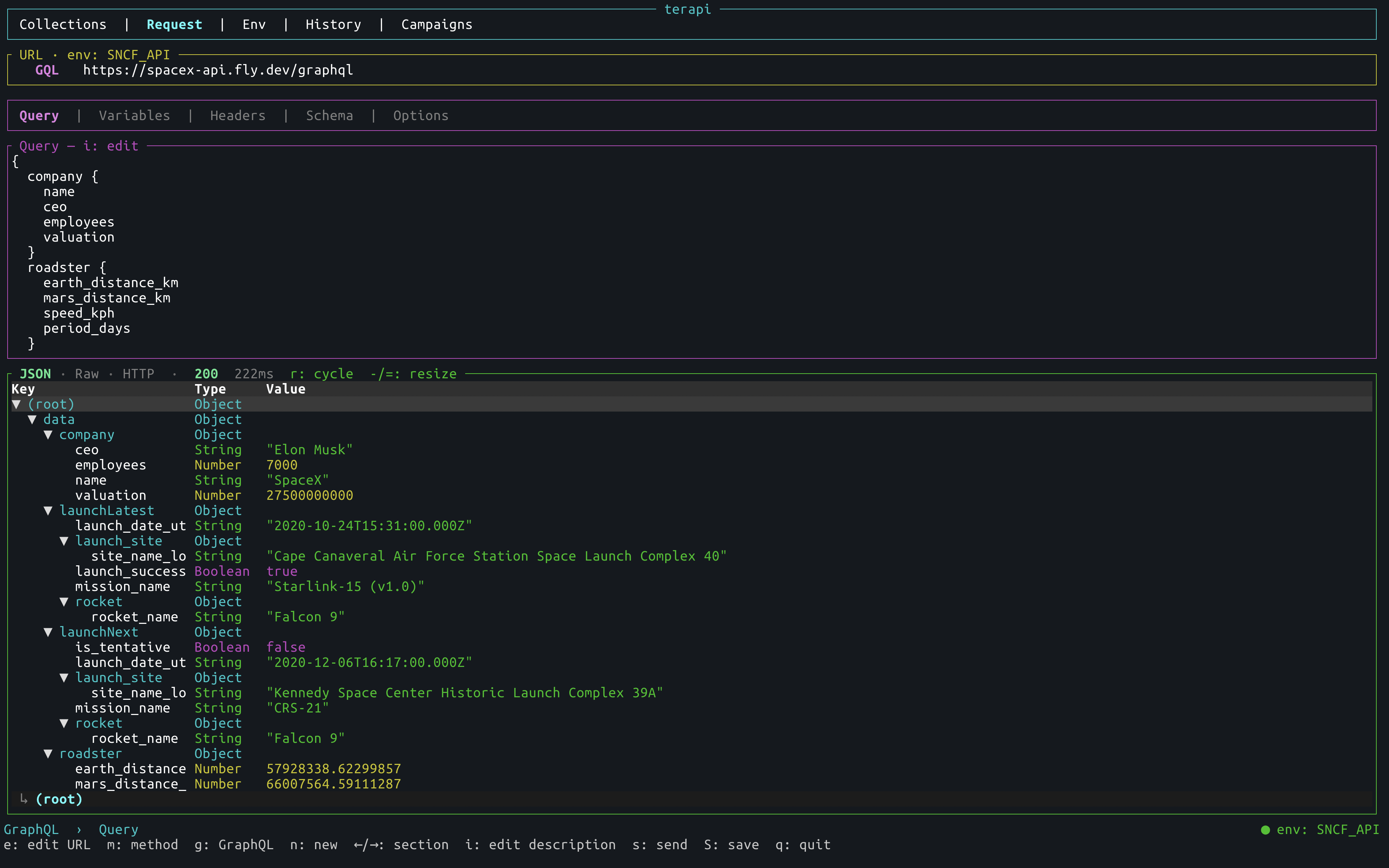
Press g on the Request tab to activate GraphQL mode. The URL bar shows a magenta GQL badge and the sub-tabs switch to GraphQL-specific tabs.
┌─────────────────────────── terapi ────────────────────────────┐
│  Collections  |  Request  |  Env  |  History  |  Campaigns     │
├────────────────────────────────────────────────────────────────┤
│ ┌─ GQL  https://countries.trevorblades.com/graphql ──────────┐ │
│ └────────────────────────────────────────────────────────────┘ │
│  Query | Variables | Headers | Schema | Options                │
│ ┌─ Query — i: edit ─────────────────────────────────────────┐ │
│ │ query CountryDetail($code: ID!) {                          │ │
│ │   country(code: $code) {                                   │ │
│ │     name  capital  currency  emoji                         │ │
│ │     continent { name }                                     │ │
│ │   }                                                        │ │
│ │ }                                                          │ │
│ └────────────────────────────────────────────────────────────┘ │
│ ┌─ 200 OK · 84 ms ──────────────────────────────────────────┐ │
│ │ ▼ data              Object                                 │ │
│ │ ▼ country           Object                                 │ │
│ │     name            String   "France"                      │ │
│ │     capital         String   "Paris"                       │ │
│ │     currency        String   "EUR"                         │ │
│ └────────────────────────────────────────────────────────────┘ │
├────────────────────────────────────────────────────────────────┤
│ GraphQL  ›  Query                    ● env: Production         │
│ i: edit query  s: send  S: save  ←/→: section  g: REST mode   │
└────────────────────────────────────────────────────────────────┘
| Sub-tab | Purpose |
|---|---|
| Query | Multi-line editor — i to edit, Esc to exit; {{VAR}} picker; Ctrl+Space to autocomplete |
| Variables | Key/value pairs serialised as the variables JSON object |
| Headers | Same header picker as REST mode |
| Schema | Schema browser — f fetch types, ↑/↓ navigate, Enter load fields |
| Options | Same options as REST mode (TLS, redirects, timeout, cookies) |
Sending a GraphQL request:
- Press
eto edit the endpoint URL - Press
←/→to reach the Query tab, thenito write the query - Press
Ctrl+Spaceto open the autocompletion popup — fields from the loaded schema type, or type names if no detail is loaded - Optionally switch to Variables (
←/→) and pressato add variables - Press
s— terapi posts{"query": "...", "variables": {...}}withContent-Type: application/jsoninjected automatically
Browsing the schema (Schema tab):
- Press
f— fetches{ __schema { types { name kind } } }and shows all user-defined types on the left (OBJ / ENM / INP / INT / UNI badges) - Navigate with
↑/↓, pressEnterto load fields, arg types and return types on the right - Once a type is loaded, switch to the Query tab and press
Ctrl+Spaceto complete field names from that type - Uses two shallow queries (depth ≤ 3) — works even on APIs with CDN query depth limits
Collections — press S to save. The TOML stores graphql = true, graphql_query, and graphql_variables. Loading a GQL request from Collections (Enter on the node) restores everything and activates GraphQL mode automatically. The node shows a magenta GQL badge in the tree.
Press g again to return to REST mode (URL and headers are preserved).
Example GraphQL collections in examples/collections/:
rick-morty-graphql.toml— Rick & Morty API — 6 folders, 17 requests: variables, pagination, multi-ID, aliases, filters, introspectioncountries-graphql.toml— Countries API — 5 folders, 19 requests: filters, glob, inline fragments, introspectionspacex-graphql.toml— SpaceX community API — 8 folders, ~20 requests: company, rockets, dragons, ships, launches (latest/past/next/paginated/by-rocket), capsules, cores, missions, roadster, history, introspection
Terapi supports two OAuth2 flows in the Auth sub-tab. Press Space/Enter on the Type row to cycle to OAuth2 CC (Client Credentials) or OAuth2 AC (Authorization Code).
OAuth2 Client Credentials — machine-to-machine, no browser:
| Field | Example |
|---|---|
| Token URL | https://auth.example.com/oauth/token |
| Client ID | my-client |
| Client Secret | secret |
| Scope | api:read (optional) |
Press s to send — terapi fetches the token automatically first, then fires the request. The token is cached for its expires_in lifetime. Press f to refresh the cache without sending.
OAuth2 Authorization Code — browser-based login:
| Field | Example |
|---|---|
| Token URL | https://auth.example.com/oauth/token |
| Client ID | my-client |
| Client Secret | secret |
| Scope | openid profile |
| Auth URL | https://auth.example.com/oauth/authorize |
| Redirect Port | 9876 (local TCP port for the callback) |
Press f — terapi opens your browser on the authorization URL, starts a local TCP listener on the redirect port, captures the authorization code when the browser redirects back, exchanges it for a token, and caches it. Then press s to send.
Auth config (all fields except the token itself) is saved in the collection TOML under [auth] with backward-compatible #[serde(default)]. The token is never written to disk — session only.
terapi build — an interactive TUI campaign editor, built into the same binary. No extra install. Creating a campaign TOML by hand is powerful but tedious — the Builder turns it into a keyboard-driven experience:
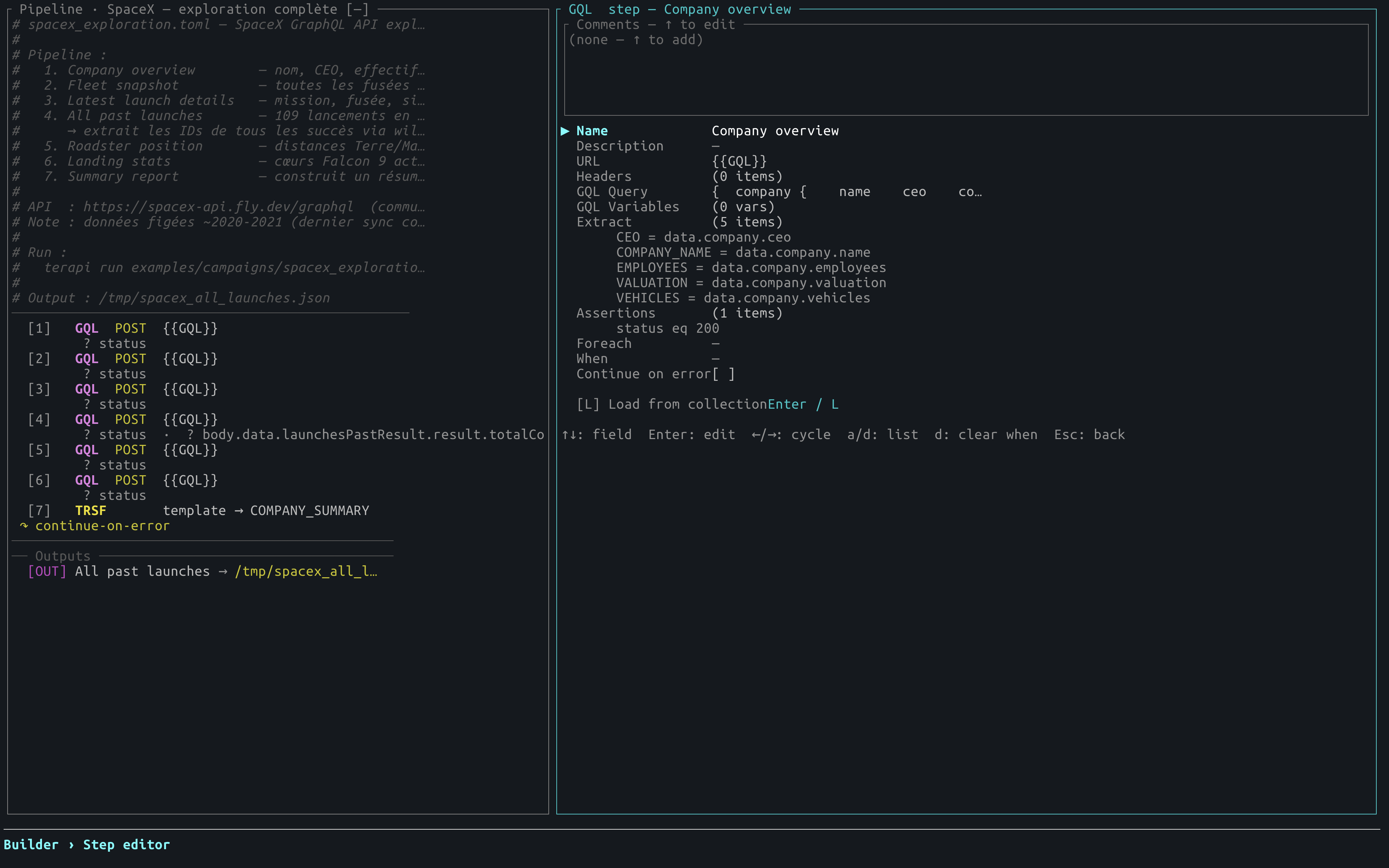
terapi build                        # blank campaign
terapi build my_campaign.toml       # edit an existing file
What's in the builder:
- Numbered pipeline — steps with badges (
HTTPTRSFWAITSEEDFILESRCHLOOPPOLLSETBILDJQPARNTFY#) and inline hints (↻foreach,⊘when,?assertions);Dduplicates the selected step,ddeletes (with confirmation — pressdagain to confirm),K/Jreorder - [IN] / [OUT] sections — navigable connectors above steps and output blocks below
- Brick catalog — HTTP, Transform, Pause, Seed, File Loader, Search / Filter, Build JSON, JQ transform, Loop, Poll, Parallel, Set, Notify, Comment, Connector [IN], Output [OUT]
- Step editor — all fields for every step type; multi-line body textarea; assertions, when, foreach guided entry
- Run step (
r) — execute the current step immediately; full right panel shows status, assertions, extracted vars, body; step name and value columns adapt to panel width;↑/↓/PgUp/PgDnscroll vertically;←/→scroll horizontally for long URLs/values;Escreturns to editor (result kept in memory forTab→path autocomplete) - JSON path autocomplete (
Tabon Extract value) — after running a step, picks dot-paths from the response JSON - Load from collection (
L) — browse existing collections and fill method/URL/headers/body in one keystroke - Variables panel (
v) — full CRUD on the[env]block - Checker (
c) — static validation per step kind (URL for http/graphql/loop/poll/notify, jq_input+expression for jq, vars for set, fields for build, input for search, steps list for parallel, file_path for file);{{VAR}}resolution across all fields; vars produced by set/jq/search/file/build propagated to downstream checks; invalidfrom_stepreferences; duplicate/empty step names - TOML preview (
p) — syntax-highlighted live preview ([section]cyan,[[array]]magenta, strings green) - Save (
w) — writes to the target file or<terapi_dir>/campaigns/ - Quit confirmation —
y / n / Escprompt when there are unsaved changes
Full reference → USAGE.md — Campaign builder
| Role | Crate |
|---|---|
| TUI rendering | ratatui + crossterm |
| HTTP client | reqwest (async) |
| Async runtime | tokio |
| Serialization | serde + serde_json |
| Config / campaigns | toml |
| CSV connector | csv |
| CLI | clap |
| Config dir resolution | dirs |
| Error handling | anyhow |
| Body editor | tui-textarea |
Other keyboard-driven TUI tools from the same author:
| Project | Description |
|---|---|
| jsoned | Keyboard-driven TUI for viewing and editing JSON, with format conversion (YAML, TOML, CSV). Works great as $TERAPI_JSON_EDITOR. |
| rowdy-db | Fast, modern TUI database management tool written in Rust. |
Bug reports, feature requests, and questions are welcome:
- GitHub issues — github.com/TSODev/terapi/issues
- Email — thierry.soulie@tsodev.fr
MIT — © TSODev